PDF Maker: Create PDFs from Photos, Web, and Scanned Documents
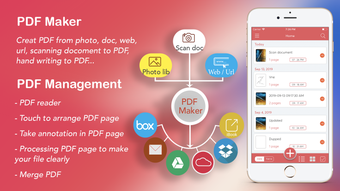
PDF Maker is a versatile iPhone application that allows users to easily create PDF files from various sources such as photos, web pages, scanned documents, and more. With the ability to share these PDFs via email, Dropbox, iCloud, Google Drive, and iBooks, PDF Maker offers a convenient solution for managing and distributing important documents.
One of the standout features of PDF Maker is its Grid layout option, which allows users to create PDFs with multiple photos on a single page. This is particularly useful for creating photo albums or presentations. Additionally, users can add text and photo descriptions to their PDF pages, providing context and additional information.
PDF Maker also offers PDF management capabilities, allowing users to cut, merge, and arrange PDF pages according to their preferences. The app supports password encryption, ensuring that sensitive documents can be securely shared with friends and colleagues.
Another useful feature of PDF Maker is its annotation tool, which allows users to take notes and draw on PDF pages. This can be helpful for marking up documents or highlighting important information.
In terms of sharing and syncing, PDF Maker supports various options including email, Dropbox, Google Drive, and popular messaging apps like WhatsApp. This makes it easy to share PDF files with others, regardless of their preferred platform.
Overall, PDF Maker is a powerful tool for creating, managing, and sharing PDF files on the go. Its intuitive interface and range of features make it a valuable addition to any business or productivity toolkit.